February 28, 2011

5 Ways to Free Yourself From Over commitment!!

Leave a Comment
5 Ways to Free Yourself From Over commitment!!

What is Over Committment?

To bind or obligate (oneself, for example) beyond the capacity for realization. How to prevent it? Here are some ways..

To prevent over committing, you have to learn to say “no”. For many, especially you ladies out there (you know who you are) saying “no” is akin to getting a root canal. It’s thoroughly unnatural and completely painful.

Here are five strategies and techniques to help you say “no” and free yourself from the stress of over commitment, once and for all.

1. Know your priorities.

Being clear about what is truly important to you is the first step to saying no. When you know what you want out of life, you’ll be more deliberate about how you spend your time. It will be easier to see when obligations, tasks and responsibilities fit into your ideal life plan, and when they don’t.

2. Know your bosses priorities.

OK you say, “But it’s not me. It’s my boss. He just keeps piling on the work. How can I tell my boss ‘no’ without getting fired or passed over for promotion?” Good question. Again, let’s get back to priorities. Do you know your bosses priorities? Do you know the priorities of your boss’ boss?

3. Say no for now.

If your boss plops a new project on your lap, look for ways to postpone starting the project – if your plate is already full. Try an approach like this: “That sounds like a great project. I can see the positive impact it would have on our organization. I’d love to start working on it in a month, after I have wrapped up projects X and Y. Are you agreeable with that?” You’ll show your boss your impeccable time management skills and how in sync you are with your organization’s goals. And he or she never had to hear the word “no” – how great is that?

4. Know how to say no.

Say things like “Thank you for the offer, but I’ll have to pass this time.” Or “Thank you, but that doesn’t fit in my schedule right now.” Having some pre-rehearsed, friendly ways of saying “no” will help you muster the courage to decline offers graciously when you want to and need to.

5. Approach no from a position of power.

Instead of saying “I can’t do this” say “this doesn’t fit my priorities right now.” When you say “I can’t” the words themselves feel powerless. By realizing something doesn’t fit your priorities and turning it down, you’re putting yourself in a position of power: the powers to make decisions that help you get what you want out of life.

Using these five techniques you will free yourself from the stress of too much to do and create time to do what you enjoy … like just hanging out with your family or playing ball in the front yard. Doesn’t that sound nice? Just say “no” and you can have it, too!
Read More...

Wedding Invitation

Leave a Comment
Today One of my SEO friend from Hyderabad sent me an invitation. It goes like this..

Hi,

I know,
  • You are the pillar of your project/ software company/college. Or
  • All the modules need your input to execute properly. Or
  • Students will get disappointed without your lecture. Or
  • Whole wireless network will come down if you take leave. Or
  • All clients will be in problems in case of your absence. Or
  • Roads, buildings and dams will collapse if you are not at work.
But, it is my marriage and it is your responsibility to be there.

So, stop all your development, maintenance and bug-fixing works. Plan your trip. My wedding occasion doesn’t contain catch blocks for No Time Exception, Too Busy Exception, Next Week Delivery Exception and other runtime errors.

Please consider this as my personal invite and do grace the occasion. Please find attached the Wedding card for the details.


Thanks & Regards

So funny and so on to the point. I couldn't skip as I have no handler for the exceptions

English Proverb...

Bachelors should be heavily taxed. It is not fair that some men should be happier than others…
-Unknown.

Before marriage, a man yearns for the women he loves. After marriage, the ‘Y’ becomes silent…
-Unknown.

The first bond of society is marriage…
-Cicero.

It’s a funny thing that when a man hasn’t anything on earth to worry about, he goes off and gets married…
-Robert Frost.

A man without marriage is like a vase without flowers…
-African Proverb.

What counts in making a happy marriage is not so much how compatible you are, but how you deal with incompatibility…
-Leo Tolstoy.

By all means of marry, if you get a good wife, you’ll be happy. If you get a bad one, you’ll become a philosopher…
-Socrates.

Marriage halves our grief, Doubles our joys, and quadruples our expense.

It is true that love is blind but marriage is definitely an Eye Opener
Read More...

Newly Launched Social Bookmarking Sites

Leave a Comment
Read More...

25 SEO Firefox Add-ons

1 comment

Here are 25 free search engine optimization add-ons that you can add to Firefox. (Note: although all of these tools are available free of charge, some tools do have a suggested donation to cover development costs.)

  1. SEO Doctor–Allows you to see how any website you visit is optimized in terms of SEO. It offers easy diagnosis of SEO problems and even offers solutions for common problems.
  2. SeoQuake SEO Extension–Extension allows users to obtain and investigate many important SEO parameters of the internet project under study on the fly, save them for future work, compare them with the results, obtained for other, competitive, projects.
  3. SenSEO–Analyzes web pages and tells you how good they fulfill on-page Search Engine Optimization criteria.
  4. Foxy SEO Tool–Toolbar that lets you access many well-known search engine tools like Google Site, Yahoo! Site Explorer, Live Fromlinks. It also includes well-known web traffic analysis sites like Alexa, Compete, Quantcast, as well as popular statistic aggregators like Quarkbase and WebSiteOutlook. Use this tool to check a site’s listing in many important directories.
  5. SEO Workers Web Page SEO Analysis Tool –Lets you to perform a basic analysis of the page in your browser with a single click. The results from the SEO Workers Analysis Tool are structured into useful groups.
  6. SEO Toolbar–This toolbar is fully customizable. There are several different views available, including icons and text, icons only or page ranks only (PageRank, Alexa Rank and PI Rank).
  7. SEO Professional Toolbar–Offers many SEO-related tools in one place. Display PageRank, S-Rank and the number of backlinks for visited pages. This toolbar also stores the history of ranks for selected sites. Highlight words, links, view number of words and more.
  8. SEOpen–Includes tools for Google backlinks, Yahoo backlinks, PageRank checker, and http header viewer.
  9. Swoosty SEO Tools–A tool that automatically shows the Google PageRank and Alexa ranking of all the sites you visit, and provides other essential tools for complete analysis. You can also activate and deactivate it without having to restart Firefox.
  10. KGen (Keyword Generator)–Lets you see what keywords are predominant on the web pages that you visit.
  11. SEO Stats–Provides an analysis of the popularity of your website. From Facebook to Twitter, you’ll know exactly how many links to your site are available through social networks and the number of backlinks and pages indexed in the major search engines.
  12. SEO and Site Analysis–Click on the SEO WooRank icon to generate an SEO report for your website.
  13. Affilorama SEO Toolbar –Provides you with useful information and data to make domain and page analysis of domains easier.
  14. Niche Watch Tool–Gives you the technical information you need to beat your online competition. This tool tracks backlinks number, indexed pages, keyword occurrences on the page, page rank, all in anchor, all in title, and all in text rank.
  15. Search Status–Shows helpful information like the Google PageRank of a page and its Alexa rank. It also includes Compete ranking and the SEOmoz Linkscape moz rank for a page. This tool also displays a fast keyword density analyzer, keyword/nofollow highlighting, backward/related links, and Alexa information.
  16. SEOHand–Keeps a record of a site’s placement on Google and Yahoo for any given keyword. Watch Google PageRank (PR), Backlinks, Saturation over time. The data is presented in graph and table format.
  17. SEO Status Page Rank/Alexa Toolbar–See Google Pagerank (PR) and Alexa rank for each website you visit.
  18. SEO Live YS Rank–Live search rank at the status bar, top searched keywords and search volume data for a specific site. Great for search marketing, keywords research and SEO.
  19. SmartPage Rank Toolbar–Includes the Alexa Rank and Page Rank. The usage of this toolbar will increase the Alexa Rank of the websites you visit.
  20. The KPRMS Toolbar–Website ranking and keyword monitoring service for Google, Yahoo and Bing. (As of this publication, this add-on has not been rated.)
  21. Money Quake–Displays your real-time earning statistics from most popular advertisement systems (like AdSense etc).
  22. SEO Info–Provides some information on the site you visit: indexed pages, backlinks, link report, pages reported on social network, pagerank, alexa rank, whois, and much more. (As of this publication, this add-on has not been rated.)
  23. SEO Status–Shows Google PR and Yandex TYC in status bar. Information can be load automatically or by click. Also highlights rel=nofollow and noindex tags.
  24. SEO Tools–Collection of useful search engine optimization tools.
  25. SEO Monitor –Information for SEO monitor users displayed in status bar.

We’ve shared 25 search engine optimization add-ons to help your freelancing business succeed. Now it’s time to discuss why freelancers should be aware of SEO techniques.

Read More...

February 18, 2011

Instant Approval Directory list

13 comments

Instant Approval Directory list
  1. http://onlinelinksdirectory.com/
  2. http://gatherurls.com/
  3. http://dirblast.com/
  4. http://linksmanza.com/
  5. http://clicklinkup.com/
  6. http://directorysection.info/
  7. http://dirlance.info/
  8. http://directorystumble.info/
  9. http://dironweb.info/
  10. http://directorygallore.info/
  11. http://www.instantapprovaldirectory.com
  12. http://www.littlewebdirectory.com
  13. http://www.onemission.com
  14. http://www.njmusicsociety.org
  15. http://dirpoint.info/
  16. http://directoryroots.info/
  17. http://directoryvenue.info/
  18. http://importlinks.info/
  19. http://llinkprobe.info/
  20. http://searchhood.info/
  21. http://directorygold.info/
  22. http://zeromilion.info/
  23. http://waydirectory.info/
  24. http://linkwise.info/
  25. http://linkpot.info/
  26. http://dirlookup.info/
  27. http://linkcastle.info/
  28. http://stickylinks.info/
  29. http://linksafari.info/
  30. http://linkoptimizer.info/
  31. http://unitedlinks.info/
  32. http://pressdirectory.info/
  33. http://linkmedia.info/
  34. http://linkvenue.info/
  35. http://linkstrade.info/
  36. http://linksforth.info/
  37. http://linkdashboard.info/
  38. http://linkbeach.info/
  39. http://linkally.info/
  40. http://whatsondir.info/
  41. http://webnetdir.info/
  42. http://webnetdir.info/
  43. http://linkspalace.com/
  44. http://relysocial.com/
  45. http://submittodir.com/
  46. http://24by7directory.com/
  47. http://pagesocial.com/
  48. http://directorypot.com/
  49. http://gathersocial.com/
  50. http://rediscoverlinks.com/
  51. http://watchlinks.info/
  52. http://linkspremium.info/
  53. http://socialhop.info/
  54. http://steadylinks.info/
  55. http://spicydir.info/
  56. http://linksbooster.info/
  57. http://sharingthis.info/
  58. http://linkscollection.info/
  59. http://reservelinks.info/
  60. http://lucklinks.info/
  61. http://linksmonster.info/
  62. http://mixxlinks.info/
  63. http://letuslink.info/
  64. http://submitalink.info/
  65. http://dirflyer.info/
  66. http://linksconnect.info/
  67. http://linksclew.info/
  68. http://linkshunt.info/
  69. http://directoryniche.info/
  70. http://linkscomet.com/
  71. http://way2directory.com/
  72. http://linkspublic.com/
  73. http://sociallinksdir.com/
  74. http://directory4seo.com/
  75. http://directoryunit.com/
  76. http://leapdirectory.com/
  77. http://suggestsocial.com/
  78. http://mixxlinks.com/
  79. http://analyzelinks.com/
  80. http://directoryritz.com/
  81. http://dirscoop.com/
  82. http://directorypip.com/
  83. http://dircritic.com/
  84. http://directorycrumble.com/
  85. http://linkingsocial.com/
  86. http://linkspublish.com/
  87. http://analyzedir.info/
  88. http://amwaylinks.com/
  89. http://pixelsocial.com/
  90. http://linksarcade.com/
  91. http://dirroll.com/
  92. http://dircentral.com/
  93. http://directorystumble.com/
  94. http://linksapprove.com/
  95. http://rolluplinks.com/
  96. http://categorizelinks.com/
  97. http://mazesocial.com/
  98. http://mazesocial.com/
  99. http://socialnovice.com/
  100. http://onlinelinksdirectory.com/
  101. http://www.abcsitemap.com/
  102. http://www.abcurls.com/
  103. http://www.addurltodirectories.com/
  104. http://www.allurlsonline.com/
  105. http://www.allworldurls.com/
  106. http://www.amuletdirectory.com/
  107. http://www.applydirectory.com/
  108. http://www.archcatalog.com/
  109. http://www.arenacatalog.com/
  110. http://www.askaboutnet.com/
  111. http://www.askdirectory.com/
  112. http://www.availablecatalog.com/
  113. http://www.azuritecatalog.com/
  114. http://www.azuritedirectory.com/
  115. http://www.begincatalog.com/
  116. http://www.begindirectory.com/
  117. http://www.bloomcatalog.com/
  118. http://www.bloomlist.com/
  119. http://www.bravocatalog.com/
  120. http://www.browsedir.com/
  121. http://www.choosecatalog.com/
  122. http://www.choosedirectory.com/
  123. http://www.chooseindex.com/
  124. http://www.clevercatalog.com/
  125. http://www.cluburls.com/
  126. http://www.coralcatalog.com/
  127. http://www.coraldirectory.com/
  128. http://www.decidedirectory.com/
  129. http://www.destinydirectory.com/
  130. http://www.dinamitdirectory.com/
  131. http://www.directorybravo.com/
  132. http://www.dmozy.com/
  133. http://www.docsdir.com/
  134. http://www.emeralddirectory.com/
  135. http://www.emeraldlist.com/
  136. http://www.excellentcatalog.com/
  137. http://www.excellentpage.com/
  138. http://www.expertcatalog.com/
  139. http://www.faircatalog.com/
  140. http://www.fantasticdir.com/
  141. http://www.followdirectory.com/
  142. http://www.forcedirectory.com/
  143. http://www.founddir.com/
  144. http://www.freeaddmission.com/
  145. http://www.freepagesubmission.com/
  146. http://www.freshurls.com/
  147. http://www.genialcatalog.com/
  148. http://www.genialdirectory.com/
  149. http://www.goldbrowse.com/
  150. http://www.greydirectory.com/
  151. http://www.groupurls.com/
  152. http://www.growdirectory.com/
  153. http://www.icedir.com/
  154. http://www.inflamecatalog.com/
  155. http://www.inflamedirectory.com/
  156. http://www.inflamelist.com/
  157. http://www.lookindirectory.com/
  158. http://www.morganitecatalog.com/
  159. http://www.morganitedirectory.com/
  160. http://www.nonstopdir.com/
  161. http://www.nr1directory.com/
  162. http://www.onyxcatalog.com/
  163. http://www.onyxlist.com/
  164. http://www.orangeurls.com/
  165. http://www.pagescatalog.com/
  166. http://www.pathdirectory.com/
  167. http://www.primodir.com/
  168. http://www.puredocs.com/
  169. http://www.sapphiredirectory.com/
  170. http://www.sapphirelist.com/
  171. http://www.seeindirectory.com/
  172. http://www.shinycatalog.com/
  173. http://www.shinyindex.com/
  174. http://www.signdir.com/
  175. http://www.signindirectory.com/
  176. http://www.starrycatalog.com/
  177. http://www.starrydirectory.com/
  178. http://www.starryindex.com/
  179. http://www.starrylist.com/
  180. http://www.stayindirectory.com/
  181. http://www.successfuldirectory.com/
  182. http://www.talismancatalog.com/
  183. http://www.talismandirectory.com/
  184. http://www.talismanlist.com/
  185. http://www.thesitemaps.com/
  186. http://www.tntcatalog.com/
  187. http://www.topazcatalog.com/
  188. http://www.topazdirectory.com/
  189. http://www.urlscatalog.com/
  190. http://www.urlsindex.com/
  191. http://www.urlskey.com/
  192. http://www.urlslist.com/
  193. http://www.urlspage.com/
  194. http://www.urlsworld.com/
  195. http://www.visitcatalog.com/
  196. http://www.visitdir.com/
  197. http://www.yellowdocs.com/
  198. http://www.yellowurls.com/
  199. http://www.zenithcatalog.com/
  200. http://www.zenithlist.com/

Read More...

February 17, 2011

How To Repair Your Slow Computer - 5 Quick Tips

2 comments
A computer that loads slower than a snail is not at all a good thing. If your PC works the same, stop cursing and waiting in vain. There are still a lot of things you can do if you need help repair your slow computer. And the good news for you is that you do not need any kind of hardware upgrade just to speed up your PC once again.

I. HARD DRIVE DEFRAGMENTATION

One of the reasons that your PC can be running slowly is that the files in the hard drive are scattered. This setup makes it harder for the hard drive to access information. To speed up your PC, it is a good idea to run a disk defragmenter at least once a month. Running the defragmenter can take two to four hours so you have to be patient when doing this.

How-To:

Step 1:
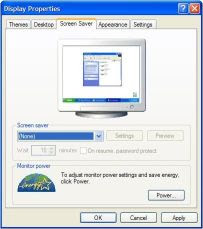
Turn off screen saver. This step is very important and necessary because on some machines if the defragmentation process is interrupted, it can cause problems. Also close all programs running. This includes the programs that run in the background such as your antivirius software. Also, it is very important not to use the computer during this time.

Step 2:
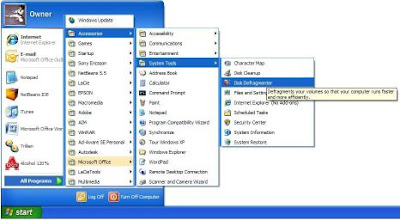
Open the Defrag utility. The defrag utility is located in your start menu. To access it click Start -> All Programs -> Accessories -> System Tools -> Disk Defragmenter.

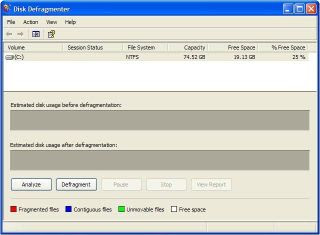
This is what the defrag utility looks like.

Step 3:
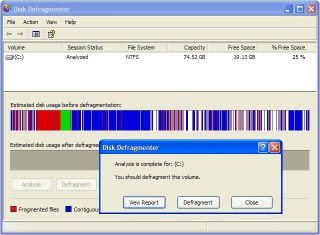
Click the 'Analyze' button which is located in the bottom left corner of the window. Then once the analysis is fully completed it will give you an option of whether you want to view a report or if you would like to defrag.

Step 4:
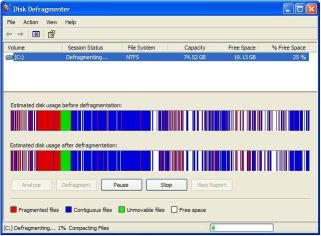
Click the Defragmenter button. This is going to start the defragmentation process, during which time it is recommended to go do something, this will take anywhere from thirty minutes to several hours. Usually most people do this overnight while they are sleeping.
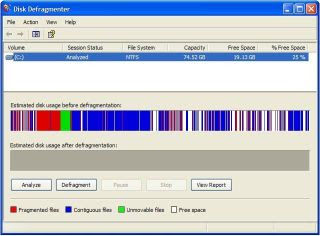

During the defragmenting the area labeled 'Estimated disk usage after defragmentation:' will start off being the exact same as before and it will start to change slowly over the duration of the time.

Step 5:
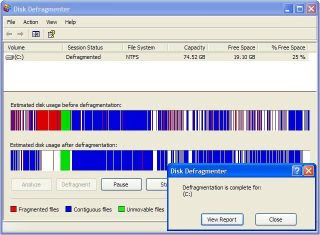
Once you receive the "Defragmentation is complete for (drive)" then you are finish with the defragmentation process. But, look at the disk usage after the process and if you see many different sections of blue separated by whites (25 or more), then i would suggest that you run the defragmenter again. Remember that you must close all programs and don't use your computer during the process, and if you really wanted to do a little better job then run the defragmenter in safe mode. To access safe mode you will need to press F8 while starting your computer to get to the boot screen. I decided that I needed to run the utility again due to there being many fragmented pieces scattered over hard drive.

Step 6:
From here on are optional steps. If you decide to run the defragmenter again then just repeat steps 1 -5 again. The following picture is the result after running the defragmenter for the second time. As you can see if you compare the result of the first and second then you can tell that there is a big difference, this time the defragmenter moved more files closer together which eliminated much of the fragmented pieces. As you can see at the beginning of the drive there is most all of the data and toward the end is free space, this is ideal since it takes less time for the computer to access the inner part of the hard drive. This is where I would have stopped, but i wanted to test out a couple theory's that I remember being said. First is that it is best to defrag more than once, which I just proved since the result is much better. The second theory that i heard was that it is better to run in safe mode which i will be testing next.
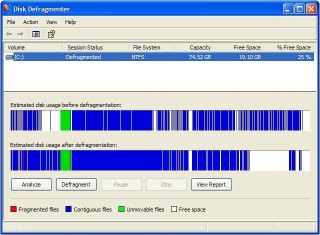

So the run the defragmenter in safe mode you must first restart your computer and press F8 at the appropriate time, tapping F8 will work too since it is hard to time. Once logged back into windows, this time in safe mode you should notice that it says 'safe mode' in all the four corner of your screen. Now that you are logged back into windows, repeat steps 1-5 to begin the defragmenter. you will notice that this time the amount of unmovable files is smaller than before, this is because there are barely any processes running since its in safe mode.


II. SPYWARE REMOVAL
Even if you think your computer does not have any kind of spyware installed in it, there is a lot of chance that it has spyware already. This is especially true if you use the PC for surfing the Internet most of the time. As you know, the spyware can make your PC run slowly. Hence, remove the spyware in your computer system through the help of spyware removal programs that you can find in the Internet.
I will give you some very useful tricks and tips to remove Spyware and Viruses for good! Follow closely:

Steps to Remove Spyware, Viruses, and Adware

1. There are many types of software available today that claim to remove spyware off our system, but which one REALLY does the job? What you need is software that not only will remove spyware, but TOTALLY removes it for good and keeps it off. After searching for the best of the best, here is THE BEST: Panda Online Scan. Why? It does not constantly run on your system, slowing it down and using bunches of memory!
In other words, it runs from Panda on the web, then searches your whole system, will remove spyware and other bugs, then gives detailed info on the bug and tells you how to keep it off your system! Here is the address to get started:http://www.stopspywareforfree.com/scan.html It only installs a few plug-ins to run on your system, and no full installation!

2. Check your system services and systray items! The biggest mistake people make is never checking what programs are running in the background or memory of the system. A key step to remove spyware from your system is knowing this. Without knowing these things, you probably have bugs running on your system, and never know it! Why? They like to hide! Download and install a program called HIJACK THIS. It tells you exactly what is running and what is not running so you know exactly what might be hiding behind closed doors! Here is the address for this: http://www.stopspywareforfree.com/hijackthis.html

3. Shutdown the SYSTEM RESTORE! (Windows XP) Spyware and Viruses attach themselves to your system's restore files. This is an easy way for them to hide, even after you reinstall Windows! Right click on 'MY COMPUTER', then click on 'Properties'. Look for a tab on top called 'System Restore', and click there. Check the box that says 'Turn off system restore on all drives'. Click 'APPLY', then 'OK'. That's it!

4. Use an Anonymous IP address when surfing the web! This is a huge step in keeping bugs off your system forever! Bugs get onto your system and retrieve info about you by capturing your IP address. Your IP address tells everyone who you are, where you're located, your system info, what kind of Windows you use, your browser, etc. An anonymous IP hides your IP by using an Anonymous address and makes you invisible to everyone, including Spyware and Ads! Here is an address to a good proxy list:http://www.stopspywareforfree.com/proxylist.html

Please follow these instructions carefully for Microsoft Internet Explorer:

  • Scroll down on the page from the above link. On the list, look at the numbers listed under IP:Port Host name. Make sure the uptime on the right is at least 97 to 99 %.
  • Go to the Control Panel in Windows.
  • Open up ' Internet Options'.
  • Click on the 'Connections' tab on top.
  • Click on 'LAN Settings'.
  • Put a check-mark where it says PROXY SERVER.
  • In the Address box, copy and paste the IP address listed on the proxy list (for example: 148.244.150.58 - These are the numbers shown BEFORE the ':' (semi-colon).
  • Copy and paste the port number into the PORT box (for example: '80' - the number immediately after the semi-colon).
  • Click OK, and OK again to close, and close everything.
  • Go ahead and open up your browser and try surfing the internet to test.

Thats it! You are now surfing invisibly! For the Firefox browser:

  • Open up the browser and go to 'TOOLS' then 'OPTIONS'.
  • Go to 'GENERAL' on the left, then click the 'Connection Settings' button below.
  • Choose 'Manual' proxy config from the choices.
  • Check the 'use the same proxy' checkbox.
  • In the 'HTTP Proxy' box, copy and paste the anonymous IP, and the PORT number in the PORT box (remove the zero first).
  • Click OK, then OK again to close.
  • Now test your browser by surfing the web.

You are now invisible.

**note - if your browsing gets super slow or has a problem, look for another IP and Port number on the list and try again. Most of the time the proxies from Mexico work best. Happy surfing! The free proxy list can be found here: http://www.stopspywareforfree.com/proxylist.html


5. Download and install the new FIREFOX browser!

Please get rid of Microsoft Internet Explorer on your system! It is like a pipe that feeds Spyware, Ads and Viruses onto your system. There are just too many holes there letting everything in. Mozilla is a fairly new company that introduced a new breed of browser that blocks popups, and tries hard to keep these bugs off your system. It has very few or even NO holes or pipes to let the bugs in! Many people use it for this very reason, and it has a great look, better speed, and lets you change the theme of it! Awesome!

III. MEMORY EXPANSION:
If the reason for your slow computer performance is too much files or too much programs operating every now and then, it is a good idea to expand the memory of your hard drive. Doing this is as simple as opening the memory slot to give way to the installation of the new chip. However, this can be a very complicated task for an amateur like you so better seek the help of a technician for this.
So, here are the simple instructions to follow:

1. Make sure you're logged in as an administrator - you will not be able to change certain things on your computer without be logged in under this (most likely you will already be logged under administrator).

2. Right click on My Computer, scroll down, and right click on Properties.

3. A new screen will pull up and will say General. Go over 3 more tabs and left click on Advance.

4. Next, left click on Settings (located in Visual Effects, Processor Scheduling, Memory Usuage, and Virtual Memory). Once you have clicked on Settings, this should bring up your performance options.

5. Now, left click the third option down called Adjust for Best Performance (located in Visual Affects).

6. Next, left click the next tab over labeled Advance.

7. Now, change the top and middle sections to Programs by left clicking on the choice labeled Programs in each section.

8. On the bottom section, left click Change.

9. On the next page that pulls up, left click C:.

10. Now, left click Custom size.

11. Increase to double what is listed for initial size, making sure the number you type in is in multiples of twelve or your computer will crash. For maximum size, just triple the number.

12. Now, left click Set and then left click OK.


IV .BACKGROUND PROCESSES DESACTIVATION:

There are programs in your computer that can be working in the background without you knowing them. These programs, despite you not using them, can suck up your computer system and thus slow your computer down. Check the processes tab on your computer and end the task of the programs that you are not using. If this sounds like a complicated job for you, a registry cleaner will help you do the job. Most of today's registry cleaners have a feature to effectively handle the background processes in your computer.

To check for a particular process, you open the Windows Task Manager. This is done by hitting Control + Shift + Escape on the keyboard. Click the processes tab when
the task manager appears, and you should see something like the following:

Qttask.exe - This is the QuickTime system tray and is not at all needed.

To disable it: Right click the QuickTime icon in the system tray and choose "QuickTime Preferences"

In the preferences window that appears click the "advanced" tab and uncheck the tick box next to "Install QuickTime icon in system tray" then click "ok"

Jusched.exe - This is the Java Automatic Update process and is not needed, most people just prefer to manually download new JRE releases

To disable it:

Click the start button, and then open the control panel. Double click on the "Java" icon

In the Java windows that appears click the "Update" tab then uncheck the tick box next to "Check for updates automatically. Then click OK.

WISPTIS.EXE -This executable runs as a system service that provides pen-data collection for other components of the SDK. When a component needs to interact with the pen (for example, to collect ink or to detect gestures), this executable is spawned as a service to communicate directly with the input device. On a Tablet PC,

Wisptis.exe interacts with the digitizer, whereas on a desktop it interacts with the mouse as well.

Wdfmgr.exe This is included with Windows Media Player 10 and adds support for windows user mode drivers. It's not at all needed and can be disabled.

Click the start button and then click on "run". In the run box type "services.msc" then click OK.

In the Services window that appears scroll down to find the "Windows User Mode Driver Framework" service. Double click on it.

In the properties window that appears click the box to the right of the "startup type" text. Choose disabled. Now click the "stop" button. Then click "OK" and close the services window.

V . WINDOWS REGISTRY CLEANUP:

This is the best approach to speed up your slow computer. It is quite unknown to many that when the computer registry has a lot of entries in it, the computer tends to become slower. With numbers of entries of deleted programs in the registry, you need to free the registry with them.

There are two options to clean the registry. One is manual removal and the other is automatic. The first one is not advisable because if you accidentally delete an important entry, you can make your whole computer system to fail. Hence, automatic removal with the help of registry cleaners will be the best solution to clean your windows registry. There are a lot of applications in the Internet but be careful to choose only the most reliable and credible program.

True enough, there are tons of things you can do if you need help repair your slow computer. So what still are you waiting for? Stop your suffering today and act on making your computer perform better and faster.
Read More...

February 13, 2011

Happy Valentine Day | Love SMS

Leave a Comment
1.
Love comes
through the hands
that touch
With
unabashed affection,
For only
skin-to-skin can love
Maintain
its true direction.
I love u my Valentine.

2.
Eid is for All
Independance day is for All
Happy new year is for All
Xmis for All
.
.
.
Birthday is for me
.
.
.
But I celebrate
Valentine's day Just for u.

3.
In life there r 5 things u should never lose

Character
Self respect
Hope
Heart
.
.
.

&
.
well U know my name

So Be My Valentine.

4.
Valentine Oh Valentine…..,
Darlin’ won’t you please be mine….,
My love for you is on the line…..,
Lovely Valentine….!

5.
If you would be my valentine
My heart would surely glow
And if you'd be my valentine
I'd want the world to know.


6.
May the Valentine's Day spirit fill your heart
With love and joy on this special day.
A time to exchange messages - a spirit of love,
Sentimental verses sent in a poetic way.


7.
On this day made just for lovers
something weighs heavily on my mind
yet still I have to question
.
.
.
Will you be my valentine?


8.
I wish to live in ur eyes

Die in ur arms

&

Be buried in ur heart

Happy Valentine's day

9.
One Two
How r u

Three four
Love me more

Five six
Date is fix

Sis seven
U r my Heaven

Eight nine
Be my Valentine

10.
Though to bring lot of
flowers and happyness
for this valentines day
but you said i am not
your dear not even a
friend to wish you...

Happy valentines day dear..

11.
Log Kehte Firte Hai Jise
Hum Pyaar Karte Hai Wo Ek
Chand Ka Tukda Hai,

Par Unhe Kyaa Pata Jise Mai
Pyaar Karta Houn Chand
Uska Ek Tukda Hai.

I Love You And Happy Valentines...

12.
Anyone can catch your eye,
but it takes someone special to
catch your heart.
Happy Valentine's Day

13.
Some People are So Much
Important in our Life.
Not because We Enjoy
their Company.


But Because We Feel
Sooo much Loneliness
in their Absence.

Happy Valentine's Day.

14.
This is not a special day
for me because i celebrate
my every day like a
"Velentine Day" since you
are with me............

Happy Valentine Day......

15.
A vow of love's the final seal
Upon an edict fully writ,
Not altering the sense of it,
Nor adding to the love we feel;
I Love u!

More Velentine Day SMS @ Cute SMS Messages
Read More...

February 10, 2011

DO NOT BUY Petrol on 14 th Feb 2011

Leave a Comment

Dear All!

Petrol in Pakistan Rs17 per litr

Mala ysia Rs 18 per litr

In India it's Rs.65per litr

Why is there a difference within India itself? World Market CRUDE Oil is not the reason for this. It's all Gain for private owners? As we are the general public, or Common Man as R.K.Laxman wud hv said, we have to raise our voice, let's raise thru Emails.

Forward this to all Indians who care.

IT HAS BEEN CALCULATED THAT IF EVERYONE DID NOT PURCHASE A DROP OF PETROL FOR ONE DAY AND ALL AT THE SAME TIME, THE OIL COMPANIES WOULD CHOKE ON THEIR STOCKPILES.

AT THE SAME TIME IT WOULD HIT THE ENTIRE INDUSTRY WITH A NET LOSS OVER 4.6 BILLION DOLLARS WHICH AFFECTS THE BOTTOM LINES OF THE OIL COMPANIES.

THEREFORE "

Feb.14 th" HAS BEEN FORMALLY DECLARED "STICK IT UP THEIR BEHIND " DAY AND THE PEOPLE OF THIS NATION SHOULD NOT BUY A SINGLE DROP OF PETROL THAT DAY.

THE ONLY WAY THIS CAN BE DONE IS IF YOU FORWARD THIS E-MAIL TO AS MANY PEOPLE AS YOU CAN AND AS QUICKLY AS YOU CAN TO GET THE WORD OUT. WAITING ON THE GOVERNMENT TO STEP IN AND CONTROL THE PRICES IS

NOT GOING TO HAPPEN. WHAT HAPPENED TO THE REDUCTION AND CONTROL IN PRICES THAT THE ARAB NATIONS PROMISED TWO WEEKS AGO? REMEMBER ONE THING, NOT ONLY IS THE PRICE OF PETROL GOING UP BUT AT THE SAME TIME AIRLINES ARE FORCED TO RAISE THEIR PRICES, TRUCKING COMPANIES ARE FORCED TO RAISE THEIR PRICES WHICH AFFECTS PRICES ON EVERYTHING THAT IS SHIPPED. THINGS LIKE FOOD, CLOTHING, BUILDING SUPPLIES MEDICAL SUPPLIES ETC. WHO PAYS IN THE END? WE DO!

WE CAN MAKE A DIFFERENCE.IF THEY DON'T GET THE MESSAGE AFTER ONE DAY, WE WILL DO IT AGAIN AND AGAIN. SO DO YOUR PART AND SPREAD THE WORD. FORWARD THIS EMAIL TO EVERYONE YOU KNOW. MARK YOUR CALENDARS AND MAKE* *

*Feb.* 14 th

A DAY THAT THE CITIZENS SAY

"ENOUGH IS ENOUGH"

REMEMBER : *Feb * 14 th

Thanks & Regards

Ravi Shanker

Read More...

February 1, 2011

Keyword Research

1 comment

Keyword Research

Determin which keywords and phrases return the best search volume for your website.
Read More...

Comprehensive Tool Sets

Leave a Comment

Comprehensive Tool Sets

These websites offer a variety of other SEO tools.
  • SEOmoz - over 20 SEO tools designed to help with every aspect of search engine optimization.

  • Link Vendor - 23 tools including; page rank analysis, cloaking detection, and a sitemap generator.

  • Webmaster Tools - keyword density checker, URL redirect checker, page rank prediction and many more.

  • SEO Chat Tools - Many tools including a robots.txt generator and keyword cloud.

  • Free SEO Tools - list of more free SEO tools from SEOBook.com.
Read More...

Progress Tracking

Leave a Comment

Progress Tracking

Track the SEO effectiveness of your campaigns as well as look for issues.
  • Google Analytics - Learn about the visitors who come to your site and track your website's progress.

  • goingup web stats - A good alternative to Google Analytics that also offers keyword monitoring.

  • SERP Guard - Get immediately notified if your website has been blacklisted.

  • Google Webmaster Tools - See how Google crawls and indexes your site and diagnose problems.

  • MSN Webmaster Center - sitemap submission and get notified if MSN has problems crawling your site.

  • Yahoo Site Explorer - Submit your sitemap to Yahoo and check your backlinks.
Read More...

Website Analysis and Graders

Leave a Comment

Website Analysis and Graders

Review the search engine friendliness of your site learn of areas to improve upon.
Read More...